WorldRemit is an online money transfer service available in 150 countries, with low transfer fees and a clean mobile app. It works well for sending money from the US, UK, or Australia to Thailand, though sending from Thailand is not currently supported.
Expats who frequently send money know that in most cases, you have to spend money to send money. If you’ve been using Western Union, for instance, you know that there’s a transfer fee for every transaction. And funds transferred via local banks have higher rates since they charge transfer and exchange rate fees.
WorldRemit is a good alternative for receiving money from foreign or non-Thai bank accounts without having to go to a bank branch.
Contents
- Key Takeaways
- How WorldRemit Works
- Is WorldRemit Legit? Regulation and Ownership
- Pros and Cons
- Account Setup
- Money Transfer
- Transfer Rates
- Transfer Speed
- WorldRemit vs. Wise for Sending Money to Thailand
- Tips, Tricks, and Promos
- Final Thoughts
- Frequently Asked Questions
- Is WorldRemit legit and safe to use?
- Can I send money from Thailand using WorldRemit?
- How long does a WorldRemit transfer to Thailand take?
- Does WorldRemit have hidden fees?
- Is there a limit on how much I can send with WorldRemit?
- Is WorldRemit or Wise better for sending money to Thailand?
- What receiving options does WorldRemit offer in Thailand?
Key Takeaways
- WorldRemit supports transfers to 150 countries, but sending from Thailand is not available.
- If you are sending from the US, UK, or Australia to Thailand, the service is fast and relatively cheap.
- Transfer fees start at US$3.99 for a US to Thailand bank deposit, but always compare rates on Monito first.
- The per-transaction limit is around US$2,000 for USD transfers to Thailand, which is a drawback for larger amounts.
- Account setup is quick, but there is no sign-up option via Google or Facebook.
- Small transfers under the cap can arrive within minutes; larger transfers in other currencies may take one to three days.
- Customer service has been a weak point, so do not rely on it for urgent or time-sensitive transfers.

How WorldRemit Works
WorldRemit is an online money transfer service that allows users to send funds to 150 countries. Options for sending and receiving include cash pickup, bank deposit, Mobile Money, and Airtime top up. It works like many other online money transfer service providers, but with a few limitations. For one, sending money can only be done from fifty countries.
According to customer support staff, they’re working on adding more services for countries with limited capabilities. A few months ago, I tried sending money via bank deposit to a US and a Philippine recipient using a Thai bank account, but it wouldn’t let me.
Not being able to send money from Thailand is a major downside. But if you need to send money from your US, UK, or Australian account to your Thailand bank account, you can do so. Before creating an account, having your bank details verified, and adding a recipient, check if you can do your planned transaction.
To see whether there are limitations on other countries, I randomly chose the UK, Australia, and Singapore to send money to Thailand, and found out that you can send from those countries via bank deposit, cash pickup, and Airtime transfer. However, sending money from Thailand isn’t possible at the moment.

Is WorldRemit Legit? Regulation and Ownership
WorldRemit is part of Zepz Group (formerly WorldRemit Group), the same parent company that owns the remittance brand Sendwave. Zepz describes itself as the group “powering leading global remittance brands: WorldRemit and Sendwave,” and has been consolidating technology and operations across both brands.
In the UK, where WorldRemit Ltd is headquartered, the company is authorised and regulated by the Financial Conduct Authority (FCA) under the Payment Service Regulations 2017 and the Electronic Money Regulations 2011, with FCA registration number 900891. (Verified September 2026.) As a licensed money transfer business, WorldRemit also holds separate regulatory approvals in the other countries it operates in, and the specific licence and consumer protections that apply depend on which country you’re sending from.
If you want to check the current licensing that applies to your own sending country, WorldRemit publishes country-specific regulatory disclosures in the footer of its local site (worldremit.com/en-us, worldremit.com/en-gb, and so on).
Pros and Cons
It’s a pretty straightforward service and a great alternative to more expensive options like banks and Western Union. If you’re looking for money transfer alternatives, I would suggest examining the following pros and cons.
Pros of Using WorldRemit
- profile and bank account verification is fast and easy
- low transaction fees
- a viable option if other services don’t offer the best exchange rates
- user-friendly mobile app
- 24/7 Support
Cons of Using WorldRemit
- WorldRemit doesn’t have a currency comparison tool
- limited number of countries where users can send money
- no option to sign up using Facebook, Google account, or LinkedIn
- doesn’t allow sending more than US$2,000 per transaction
- poor customer service
Account Setup
Unlike other services, WorldRemit doesn’t allow signup via Facebook, LinkedIn, or Google, which would have been a nice option for those who hate typing in their details. Not to worry: signing up only requires your name, email, and password, and country from where you’re sending.
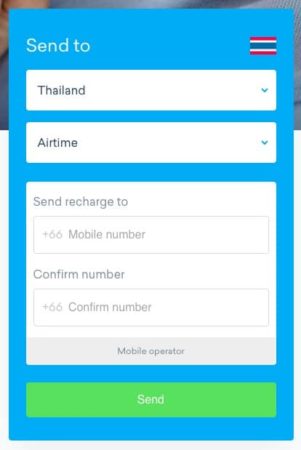
After signup, you can set up your financial details under the My Recipients page. Don’t expect an account confirmation email because there isn’t any.
When adding a recipient, you have to enter the person’s details, including address, email, phone numbers, and bank details. It’s nothing you wouldn’t do when filling out a Western Union form, but at least with a service like WorldRemit, you only do it once if you’ll be making transfers to the same recipient.
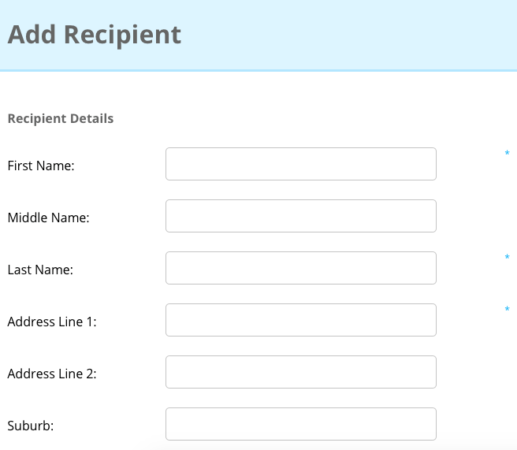
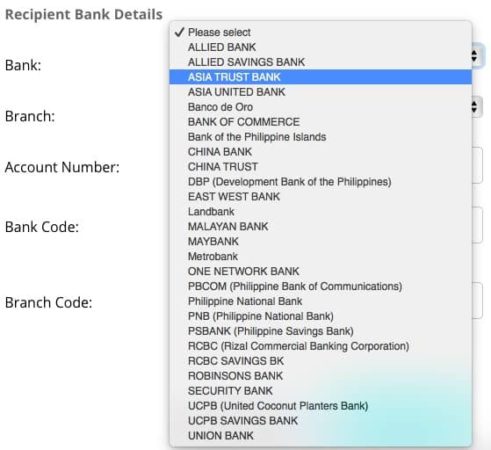
The bank details required will depend on that country’s banking system requirements. For example, if you’re sending to the UK you’ll be asked to provide a Sort Code; if sending to the Philippines, you’ll be asked to provide a Branch Code.
If you’re sending to Thailand, it has a decent coverage in terms of the banks you can send to. The service allows sending money to many major banks and a handful of smaller local banks. For an overview of the main options, see our guide to Thai bank accounts.
After setting up, you can proceed to send money.
Money Transfer
The dashboard is clean and easy to navigate mainly because its purpose is to show your list of recipients and transactions.
To begin sending money, go to the main page, select a country from the dropdown menu, click Get started, then fill out the details. You can also do this within the How it Works page.
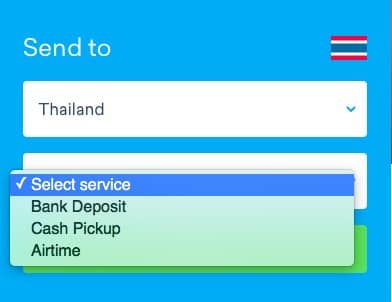
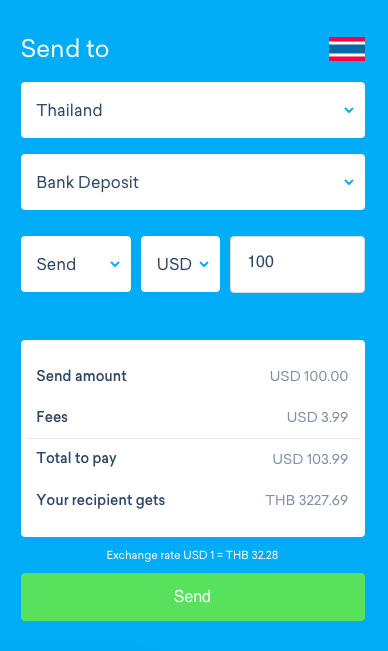
Suppose you’re sending money from the US to Thailand via Bank Deposit. The currency will automatically update to the currency of the recipient’s location. You’ll then get a quick summary: the amount you’re sending, fee amount–which varies per country, the total amount you’re paying, and the amount your recipient will receive.

The exchange rate will be shown at the bottom of the summary. Once you’ve confirmed the details, you can hit Send.
After hitting Send, you’ll be taken to the next page, where you’ll have to select a recipient. In case you haven’t added one beforehand, that’s fine. You can choose New Recipient and manually fill in the form. On the other hand, choosing a pre-selected recipient uploads the receiver’s details automatically. You’ll also be asked to specify a Sending Reason, which is standard for money transfers.
Click Next to go to the Payment page where you can select one of two Payment Methods, debit or credit card and online bank Transfer US Automated Clearing House system, which pays directly from your bank account and may take as long as four days. The latter entails a lower transfer fee, but it also requires a bit of paperwork.
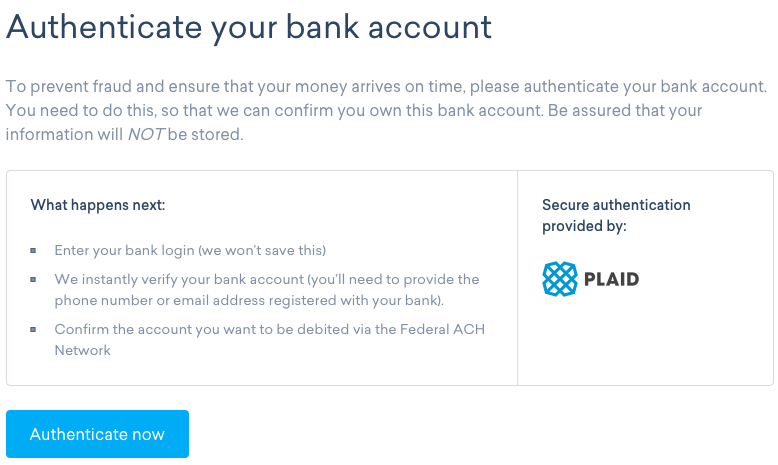
Choosing the online bank Transfer USACH option will prompt the system to authenticate the account you’re transferring from. So make sure you have your online banking details handy, including your phone number and email address registered with that bank. Note that this applies to transfers from a US account to Thailand.
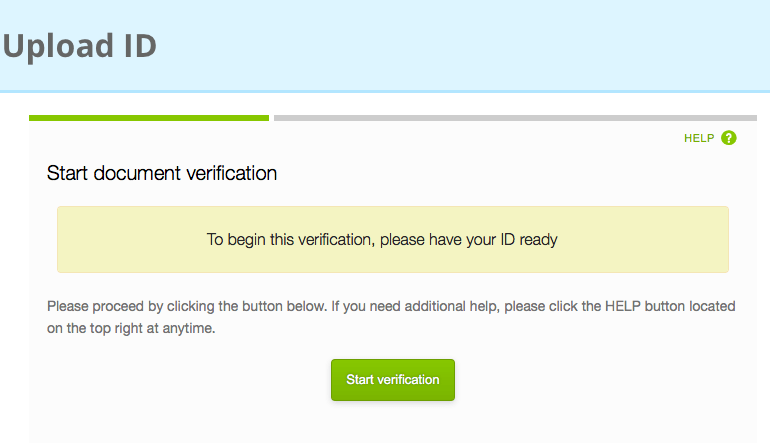
To authenticate your account, you have to submit a billing statement and an ID such as a passport.
The more common option is to make a transfer using a debit or a credit card. If you choose this option, all you need to do on the next page is enter your card number, your name as it appears on your card, expiry date, and three-digit code at the back of the card.
Then hit the Pay Now button.
Transfer Rates
How do you know if you’re saving money by using WorldRemit? You’ll have to visit a comparison portal like Monito to do so.
WorldRemit claims their service is low cost, which is true to some extent. At US$3.99 per Bank Deposit transfer fee when sending from the US to Thailand, that claim is justifiable. The same amount applies to the Cash Pickup option. Transfer rates vary per country: I tried doing a transfer to a Philippine recipient and the fee is only US$2.99, while an Australia to Thailand transfer is US$4.99. But before you use it to send money, it’s best to check other providers’ rates.
I wanted to see whether they deliver on their promise of low-cost transfers by checking the standard rates at XE and what was offered by Bangkok Bank and Kasikorn Bank, which are some of the local banks that offer international funds transfers. From the table below, you can see the rates that WorldRemit charges for every USD, GBP, and EUR transferred.
| Provider | USD | GBP | EUR |
| WorldRemit | 3.11% | 2.60% | 2.79% |
| Bangkok Bank | 3.61% | 2.02% | 1.84% |
| Kasikorn Bank | 4.08% | 3.17% | 2.15% |
How the Fee Structure Works
A WorldRemit transfer has two cost components, not one. There’s a flat transfer fee, which changes by sending country, receiving country, payment method (a bank transfer typically costs less than a debit or credit card), and the amount being sent. Then there’s the exchange rate margin, a smaller markup built into the rate you’re quoted rather than shown as a separate line item.
Because both pieces move by corridor and change over time, treat any fee figure you see in this article as illustrative rather than current. WorldRemit shows the actual fee and exchange rate before you confirm a transfer, so get a live quote for your specific amount and route rather than relying on a published number, and compare it against other providers on a rate-comparison site before you commit.
Receiving Options and Limits in Thailand
For transfers into Thailand, WorldRemit offers four receiving methods.
- Bank transfer: paid directly into a Thai bank account.
- Cash pickup: collected in cash at a WorldRemit partner location.
- Mobile money: sent to a registered mobile money account.
- Airtime top-up: credit added directly to a prepaid mobile number.
That’s separate from PromptPay, Thailand’s own domestic real-time payment system that Thai banks use for local QR and phone-number transfers. WorldRemit’s mobile money option is not a PromptPay integration; if you’re trying to understand PromptPay itself rather than international transfers into it, see our guide to PromptPay for foreigners.
Per-transaction limits also vary by corridor and by how far you’ve gone through WorldRemit’s identity verification, and they change from time to time, so treat any specific cap (including the ones quoted elsewhere in this article) as a starting point rather than a guarantee. Check the current limit for your route inside the app or website before relying on it for a large transfer.
Transfer Speed
If you use other money transfer services, you’ve probably encountered some issues with delays especially for large transfers. Transfers that are below the maximum amount can take minutes or, at least, not more than twenty-four hours to reach the recipient. WorldRemit’s maximum transfer amount varies. For instance, USD transfers to Thailand are sometimes capped at US$2,000 while at other times it’s US$2,750.
However, larger transfers in currencies other than USD can take anywhere from one to three days. Cash transfers via mobile transfer or airtime top-up are available immediately. It’s likely, however, that the number of days it takes to complete a transfer differ in every country.
WorldRemit vs. Wise for Sending Money to Thailand
Wise is the other provider most Thailand-based expats compare WorldRemit against, and the two are structured differently. WorldRemit charges a flat transfer fee plus a rate margin and leans on cash pickup, mobile money, and airtime options in addition to bank transfer. Wise is built around holding and converting balances at what it markets as the mid-market rate, with a transparent, itemized fee shown upfront.
The gap that matters most for this article’s biggest limitation: WorldRemit currently doesn’t support sending money out of a Thai account (see our guide to sending money from Thailand for what does work). If that’s your situation, check our full Wise review for a route-by-route comparison and current details on what Wise supports for outbound transfers from Thailand.
Tips, Tricks, and Promos
Expats on Reddit note that WorldRemit is generally transparent once you are logged in, but the exact fees and transfer limits can vary by corridor and are not always visible before you create an account, so it is worth running a test quote first.
It’s safe to assume that at some point, frequent WorldRemit users do receive promo codes for, presumably, a fee waiver mainly because there’s a promo code field in the Add Recipient page.
Final Thoughts
After trying it out for the transaction I needed to do, I’d say WorldRemit’s service is quite limited. I usually make transfers from Thailand to the Philippines or vice-versa. But the only service available is mobile Airtime transfer, which is no good to me. I contacted customer support to ask whether I could transfer from Thailand, but I was informed the options for certain countries are limited to mobile Airtime transfer.
For anyone else looking for an alternative to using a bank or other similar services, WorldRemit could be a great option. If you’re sending from, say, Australia, Singapore, the US, or the UK, the service is relatively fast and cheap. The mobile app works seamlessly and is a terrific way to send money on the go.
But if you need to make transfers from Thailand, WorldRemit won’t be of much use to you because transfers are currently limited to fifty-two countries and Thailand is not one of them–for now. If you’re sending or receiving in Australia, Singapore, the UK, or the US, WorldRemit works just fine. Other major drawbacks include the US$2,000 limit on sending and receiving money and the lack of detailed answers from customer service staff.
If you need alternatives, you might want to consider using Monito to check for better options and get recommendations for better rates from other providers like Wise. Other than these quibbles, you might want to bookmark WorldRemit in case you need a money transfer option if only for the cheap rates and the fast transfers.
Frequently Asked Questions
Is WorldRemit legit and safe to use?
Yes. WorldRemit Ltd is authorised and regulated by the UK’s Financial Conduct Authority (FCA registration number 900891) and is part of Zepz Group, which also owns the remittance brand Sendwave. It holds separate licensing in other countries where it operates.
Can I send money from Thailand using WorldRemit?
No, not currently. WorldRemit only supports sending from a set list of countries and Thailand is not one of them. You can still receive transfers into a Thai bank account, for cash pickup, or via mobile money and airtime top-up.
How long does a WorldRemit transfer to Thailand take?
It depends on the payment method and receiving option. Card-funded transfers and mobile money or cash pickup tend to be fastest, sometimes arriving within minutes, while bank-funded transfers and larger amounts can take one to three days. Always check the estimated delivery time shown at checkout for your specific transfer.
Does WorldRemit have hidden fees?
WorldRemit shows its transfer fee and exchange rate before you confirm a transfer, so the cost isn’t hidden at checkout, but the total cost combines a visible flat fee with a rate margin folded into the exchange rate itself. Get a live quote for your route and compare it against other providers before sending.
Is there a limit on how much I can send with WorldRemit?
Yes. Per-transaction limits vary by sending and receiving country and by your identity verification level, and they change over time, so check the current limit for your specific route in the app rather than relying on a fixed figure.
Is WorldRemit or Wise better for sending money to Thailand?
It depends on what you need. WorldRemit offers more receiving options into Thailand, including cash pickup and mobile money, while Wise is built around a transparent, itemized fee and mid-market rate marketing. If you need to send money out of Thailand rather than into it, check our Wise review, since that’s the scenario where the two providers diverge most.
What receiving options does WorldRemit offer in Thailand?
Four: bank transfer directly into a Thai bank account, cash pickup at a partner location, mobile money to a registered account, and airtime top-up for a prepaid mobile number.



 Deutsch:
 Français:
 Español: