

Thailand now issues most visas online through one government website. Here’s who actually needs an e-Visa, how to apply at the official portal, what it costs, and how to avoid the lookalike sites charging for a free government service.
Since 2025, applying for a Thai visa mostly means filling in a form at one government website and getting the visa back as a PDF in your inbox. No embassy queue, no passport sticker, no mailing your passport across the country. Thailand has moved almost its entire visa operation onto a single online platform.
The shift is convenient. It also created two new problems. Lookalike websites now charge “service fees” for a process the Thai government runs itself, and a lot of travelers apply for a visa they never needed in the first place.
This guide sorts out the confusion first, then walks the whole application from account creation to the approved PDF.
Disclaimer: Some links in this article go to our partners, and we may earn a commission if you use them. It costs you nothing extra, and we only recommend services we'd use ourselves. Read more in our Advertising Disclosure.
Contents
- Key Takeaways
- What the Thailand E-Visa Is
- Do You Actually Need an E-Visa?
- Visa Types You Can Apply for Online
- Costs
- Required Documents
- How to Apply: Step by Step
- Processing Time
- After Approval
- E-Visa vs Visa Exemption vs Visa on Arrival vs TDAC
- Common Mistakes and Pitfalls
- Frequently Asked Questions
- Can I apply for the e-Visa from inside Thailand?
- Can I apply from a country that isn't my home country?
- What happens if the embassy asks for more documents?
- Do I have to mail in or drop off my passport?
- Is the fee refundable if my application is rejected?
- Does the e-Visa replace the TDAC?
- How far in advance should I apply?
- Can I get a multiple-entry visa online?
- Sources Cited
Key Takeaways
- Thailand issues most visas online at the official portal, thaievisa.go.th (the address ends in .go.th). The visa comes back as a PDF by email, with no passport sticker.
- First work out whether you need a visa at all. Visa-exempt tourists on a short trip don’t; if you do need one, it’s almost always an e-Visa now.
- The e-Visa, visa exemption, visa on arrival, and the TDAC arrival card are four different things. The TDAC is a free arrival card every traveler files, not a visa.
- Applying takes six steps: create an account, fill the form, upload documents, pay, wait, and receive the PDF. A tourist visa fee is THB1,000 for single entry.
- Only thaievisa.go.th is official. Lookalike sites ending in .org or .com charge a markup or are outright scams.
- Apply two to three weeks ahead. Processing runs about 3 to 10 business days but depends on the handling embassy.


What the Thailand E-Visa Is
The Thailand e-Visa is the online system run by the Ministry of Foreign Affairs (MFA) at www.thaievisa.go.th. The process generally goes like this.
- You create an account
- fill in the application
- upload your documents
- pay a visa fee
- wait for approval.
When it’s granted, the visa arrives by email as a PDF. There’s no sticker in your passport anymore, which is why you’ll see it called a “sticker-less” or “e-Visa” system.
This replaced the old process, where you booked an appointment, showed up at a Thai embassy or consulate, and often left your passport with them for a few days to get a visa sticker. That version is largely gone.
The e-Visa platform has been rolling out globally, and by 2025 it covers Thai missions worldwide, so wherever you apply from, the online portal is the front door.
Good to know: There’s only one official online visa website: thaievisa.go.th. The address ends in .go.th, which is reserved for Thai government bodies. Anything else charging you to apply is a middleman at best and a scam at worst. More on that later.
Do You Actually Need an E-Visa?
The real question isn’t “do I need an e-Visa” but “do I need a visa to enter Thailand at all?” Work that out first, and the rest follows.
If your passport qualifies for visa exemption and you’re coming for a short holiday within the exempt period, you don’t need a visa, and you don’t need to touch the e-Visa portal. You just show up, complete your TDAC beforehand, and get stamped in.
If you do need a visa, in almost every case it’s now an e-Visa, because that’s how Thailand issues visas today. This applies when:
- Your nationality isn’t visa-exempt. You need a visa for any visit, even a short one.
- You’re staying longer than the exemption allows. A visa-exempt tourist who wants more time applies for a tourist visa instead.
- You’re coming for a specific purpose. Work, business, study, retirement, marriage, or long-stay remote work all need the matching non-immigrant visa, and those are applied for online too.
The website has a built-in eligibility checker as the very first step. You tell it which passport you hold and where you’re applying from, and it shows you whether the e-Visa is available for you and which Thai mission will handle it.
If you’re not sure whether you need a visa, that checker is the fastest way to find out.
Read more: Thailand Visa Guide: Every Visa Type Compared
Visa Types You Can Apply for Online
www.thaievisa.go.th handles the full range of visas, not just tourist ones. The main categories:
Tourist Visa (TR)
For tourism and short visits. The single-entry tourist visa allows a 60-day stay, extendable once by 30 days at an immigration office inside Thailand. The multiple-entry tourist visa (METV) is valid for six months and lets you come and go, with each entry giving up to 60 days.
The METV asks for more financial documentation and costs more.
Destination Thailand Visa (DTV)
A five-year, multiple-entry visa aimed at remote workers, freelancers, and people here for “soft power” activities like Muay Thai or Thai cooking courses. Each stay is up to 180 days, extendable once. It’s applied for online like any other e-Visa but has its own financial threshold.
Non-Immigrant Visas (O, B, ED and others)
These cover longer or purpose-specific stays: Non-B for work and business, Non-ED for study, Non-O for retirement, marriage, or accompanying family. Each has its own document requirements on top of the standard set, and each can be single or multiple entry.

Transit Visa
For travelers passing through Thailand on the way somewhere else, or entering for a specific short purpose like a sports event. Shorter validity, lower fee.
Read more:
- Thailand Tourist Visa: The Complete Guide
- Destination Thailand Visa (DTV): Who It’s For and How to Get It
- Thailand Business Visa Guide
- Thailand Education Visa Guide
Costs
Fees depend on the visa type and the number of entries. The portal displays the amount in the local currency of the mission handling your application, but the underlying government fees in baht are fixed. The common ones:
| Visa type | Government fee |
|---|---|
| Tourist visa, single entry (TR) | THB1,000 |
| Tourist visa, multiple entry (METV) | THB5,000 |
| Non-immigrant, single entry | THB2,000 |
| Non-immigrant, multiple entry | THB5,000 |
| Transit visa | THB800 |
| Destination Thailand Visa (DTV) | THB10,000 |
You pay online by credit or debit card as part of the application. There’s no separate “service fee” on the official site: if a website is adding one, you’re not on the government portal.
Good to Know: E-Visa fees are non-refundable once you submit, even if your application is refused. Fees also get revised from time to time, so confirm the current amount shown on the portal before you pay.
Required Documents
The exact document list depends on which visa you’re applying for. A retirement visa asks for proof of pension or savings; a work visa asks for paperwork from your Thai employer. The set below is for the tourist visa, which is the most common application and a good baseline for what to expect.
For a tourist e-Visa, the portal asks you to upload:
- Passport biodata page: a clear scan of the photo page. Your passport should have at least six months of validity left.
- A recent photograph: taken within the last six months, against a plain background. An outdated or poor-quality photo is a common reason for rejection.
- The signed declaration: you download it from the portal, sign it, and upload it back.
- Travel booking confirmation: your flights in and out of Thailand.
- Proof of accommodation: hotel bookings or a host’s address for your stay.
- Financial evidence: the official portal asks for no less than THB20,000 per person, or THB40,000 per family, typically shown through bank statements covering the last few months.
File format matters. Uploads must be JPG or JPEG (supporting documents also accept PDF), each file no larger than 3 MB. Scan documents cleanly and in full: the portal specifically warns that a passport scan cut off at the edges, or a blurry photo, can get the whole application rejected.
Tip: The exact document list can differ between Thai embassies and consulates. The embassy handling your application may ask for something the standard checklist doesn’t mention, so check the specific requirements for the embassy or consulate you’re applying through before you submit.
How to Apply: Step by Step
The official process runs in six stages, from creating an account to receiving the visa by email. The screenshots below are from the Ministry of Foreign Affairs’ own e-Visa application guide.
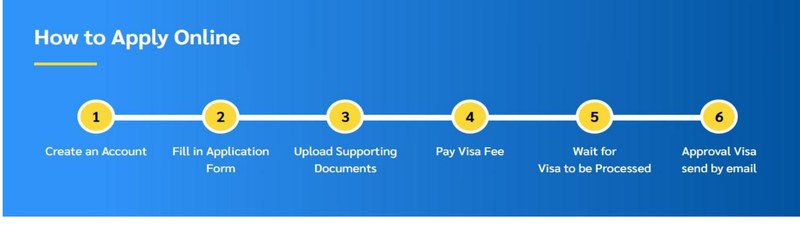
1. Create an Account
Go to thaievisa.go.th and sign up as an individual using a valid email address, which becomes your username. Your password needs at least eight characters, with an uppercase letter, a lowercase letter, and a number. You then fill in a user profile with your basic details, all in English.
An activation link is emailed to you and should arrive within 30 minutes. If it doesn’t, check your spam folder, then log in and use the resend button. You can’t start an application until the account is activated.
2. Check Your Eligibility
The application opens with an eligibility check. You select the country that issued your travel document, your permanent residency or current location, and the Thai mission you’re submitting to. This is also where the system confirms the e-Visa is available for your situation.
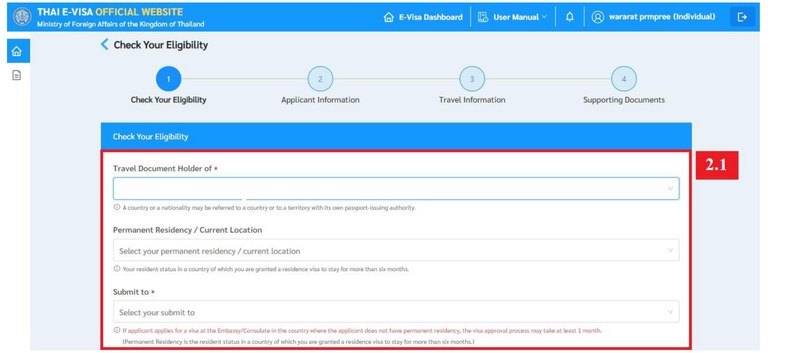
Good to Know: The portal notes that if you apply at an embassy or consulate in a country where you don’t hold permanent residency, approval can take at least a month. Apply through the mission that covers where you actually live.
3. Fill in the Application Form
Next you choose your purpose of visit and the number of entries, and the system picks the matching visa type. Then you complete your personal information, travel document details, and address. If you’re applying for yourself, one click copies everything from your profile. You can also apply on behalf of others, up to 10 people in a single batch, which is handy for families.
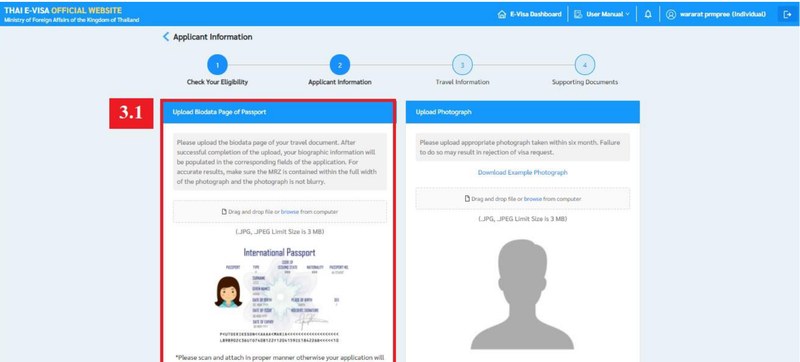
4. Upload Supporting Documents
Upload the documents for your visa type: passport biodata page, photograph, the signed declaration, and your travel booking, plus accommodation and financial evidence. Everything must be JPG, JPEG, or PDF, under 3 MB per file.
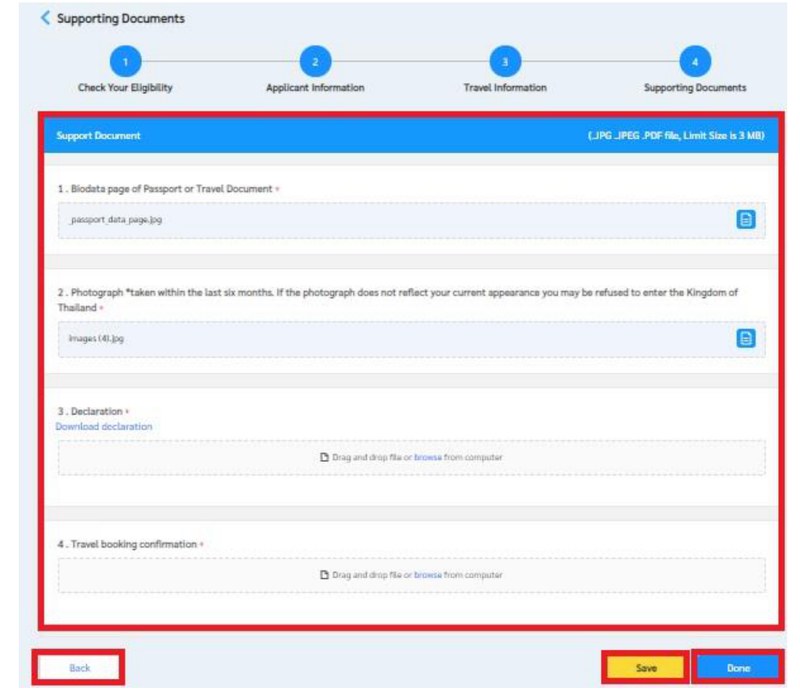
5. Pay the Visa Fee
Once your application is complete, you pay the government fee online by card. A payment confirmation is emailed to you. Remember the fee is non-refundable, so double-check every field before paying.
6. Wait for Approval, Then Get It by Email
The mission processes your application and, once approved, emails you the visa as a PDF. You can also track progress in the portal under the status menu, where applications are grouped as incomplete, completed, or awaiting a status check.
Processing Time
Officially, a tourist e-Visa usually clears in about 3 to 10 business days. In practice it varies, and the biggest variable is which mission handles your file.
Some embassies turn applications around in a few days; busier ones take longer, and the portal itself flags that applying outside your country of residence can push approval past a month.
Community Input: In the expat forums, the consistent advice is to apply well ahead of your trip and not book non-refundable flights on the assumption of a fast turnaround. Two to three weeks of buffer before you travel is sensible, more if you’re applying during a busy season or from a country where you don’t hold residency.
After Approval
When your visa comes through, you’ll have a PDF. Print a copy to carry with you, since airline check-in staff and Thai immigration may want to see it. It’s also fine to keep a copy saved on your phone or laptop as a backup.
Keep the visa with your passport through the whole journey. At check-in, the airline confirms you’re cleared to enter Thailand; at immigration, the officer matches the visa to your passport and stamps your permitted stay.
One more step before you fly: complete your TDAC within 72 hours of arrival. The visa gets you the right to enter; the TDAC is the arrival card every traveler files. They’re separate, and you need both.
E-Visa vs Visa Exemption vs Visa on Arrival vs TDAC
This is where most people get lost, so it’s worth getting straight before you touch the application. These are four different things, and confusing them is the single most common mistake.
| What it is | Who it’s for | Cost | Where |
|---|---|---|---|
| E-Visa | Travelers who need a visa to enter Thailand (by nationality or by purpose of stay) | Government fee by visa type | Online at thaievisa.go.th, before you travel |
| Visa exemption | Passport holders from countries Thailand exempts (many Western and ASEAN nationals) for short tourism stays | Free | Nothing to apply for; you get a stamp on arrival |
| Visa on arrival (VOA) | From 15 September 2026, nationals of Azerbaijan, Belarus and Serbia only, for stays of up to 15 days | THB2,000, paid in cash baht at the airport | At the immigration counter when you land |
| TDAC | Everyone entering Thailand, regardless of visa or nationality | Free | Online at tdac.immigration.go.th, within 72 hours before arrival |
Two points do most of the work here.
First, the TDAC (Thailand Digital Arrival Card) is not a visa. It’s the digital arrival card that replaced the old paper TM6 form, mandatory for every arrival since 1 May 2025. It’s free, you fill it in online within 72 hours of arriving, and even visa-exempt tourists have to do it. If a website asks you to pay for a TDAC, it’s a scam.
Second, the visa exemption just shrank. Thailand raised the visa-exempt stay to 60 days in mid-2024, then reverted it to 30. The Ministry of Interior announcement was published in the Royal Gazette on 31 August 2026 and takes effect on 15 September 2026, covering 60 countries and territories. Mauritius and Seychelles get 15 days. Anyone stamped in before 15 September keeps the stay printed in their passport. If the exemption no longer covers your trip, a tourist visa through the e-Visa portal is the usual answer.
Read more: Thailand Digital Arrival Card (TDAC): What It Is and How to Fill It In
Common Mistakes and Pitfalls
Most problems come down to a handful of avoidable errors.
Using a Fake or Middleman Website
This is the big one. The only official portal is thaievisa.go.th, ending in .go.th. Lookalike sites like thaievisa.org present themselves as official but are private agencies, often based abroad, that charge a markup on top of the government fee. Thai authorities have warned repeatedly about rising visa scams, including fake TDAC sites charging around US$10 for a form that’s free. If a site adds a “service fee” or its address doesn’t end in .go.th, close the tab.
Tip: Only trust Thai government sites ending in .go.th. Genuine Thai agencies use .co.th or .in.th, which require verified Thai business registration. A .com or .org “Thai e-Visa” site is neither the government nor necessarily accountable.
A Weak or Blurry Photo and Passport Scan
The portal reads your passport’s machine-readable strip and expects a recent photo. A cut-off scan, a blurry image, or a photo more than six months old is a routine cause of rejection. Scan cleanly and use a current photo.
Thin Financial Evidence
Consular officers are checking that you can fund your trip without working illegally. Statements showing a balance below the threshold, or a sudden large deposit that looks borrowed, invite doubt. Show a few months of steady funds, not a one-day top-up.
Bookings That Don’t Add Up
Flights and accommodation that don’t cover your stated dates, or a one-way ticket when the visa expects onward travel, undercut your application. Make the itinerary consistent and complete.
Applying to the Wrong Mission
Submitting to an embassy in a country where you don’t hold residency slows everything down. Apply through the Thai mission that covers where you actually live.
Applying When You Didn’t Need a Visa at All
Plenty of visa-exempt tourists start an e-Visa application out of confusion, pay a fee, and wait for something they never needed. Check your eligibility first.
Read more: How to Spot a Fake or Scam Thai Visa Agent
Frequently Asked Questions
Can I apply for the e-Visa from inside Thailand?
No. The e-Visa is applied for before you travel, from outside Thailand. If you’re already here and want to change or extend your status, that’s handled at an immigration office, not the e-Visa portal.
Can I apply from a country that isn’t my home country?
Not from just anywhere. In many cases, the system is tied to where you legally live. You apply through the Thai embassy that covers your country of residence, or a nearby country where you have legal status, and the portal asks you to prove it with something like a residence permit, a long-stay visa, or an entry stamp.

So if you’re an expat living outside your passport country, you apply from where you actually live, not your home country. Some embassy, Singapore and Hong Kong among them, won’t take an application from a non-citizen without proof of local residency. And you have to stay outside Thailand for the whole process.
What happens if the embassy asks for more documents?
Sometimes they will. The embassy handling your application might want extra documents, or even to see your original passport, before they decide. If that happens, they’ll let you know by email or through the portal, and you just send over whatever they’re asking for. It slows things down, so reply quickly. It’s another good reason to apply early and keep half an eye on the inbox tied to your account.
Do I have to mail in or drop off my passport?
In most cases, no. The current system is sticker-less and fully online, and the visa comes back as a PDF. Some missions may still ask to see original documents in specific situations, which the portal tells you at submission if it applies.
Is the fee refundable if my application is rejected?
No. E-Visa fees are non-refundable once you submit, even if the visa is refused. Check every detail before you pay.
Does the e-Visa replace the TDAC?
No. They’re separate. The e-Visa is your permission to enter Thailand; the TDAC is the free arrival card that every traveler files within 72 hours of arrival. You need both.
How far in advance should I apply?
Give yourself at least two to three weeks before travel, and more during busy periods or if you’re applying from a country where you don’t have residency. Don’t lock in non-refundable travel before your visa is approved.
Can I get a multiple-entry visa online?
Yes. The multiple-entry tourist visa (METV) and multiple-entry non-immigrant visas are all applied for through the portal. They require more documentation and cost more than single-entry versions.
Sources Cited
- Ministry of Foreign Affairs of Thailand, official Thailand E-Visa portal: the application system, steps, eligibility check, and document requirements.
- Thai MFA e-Visa application guides (PDF manuals): the six-step process, upload formats and file-size limits, and processing note on applying outside your residency country.
- Thailand Digital Arrival Card official site (tdac.immigration.go.th): TDAC requirement, 72-hour window, and that it is free.
- Bangkok Post: warnings on rising Thai visa scams and fake application websites.


 Français:
 Español:
 Deutsch: