People buy new phones and don’t think twice about spending hundreds of Thai baht on protective film for its screen and durable phone cases for its body. But when it comes to signing up for phone service or the Internet in Thailand, people are less likely to protect their investment with a VPN.
If you ask me, signing up for the Internet and protecting yourself with a VPN go hand-in-hand nowadays. After all, there are too many people and businesses both inside and outside of Thailand that make a profit off your data, steal your identity, or block you from getting access to services you should otherwise have access to.
A VPN helps you in all of these cases while in Thailand, and this is where Surfshark VPN comes in.
But because there are plenty of thorough techy reviews for Surfshark already, I’m going to approach this review from the perspective of a decade-long expat in Thailand.
Surfshark works well in Thailand, and its cheapest plan costs THB58 a month on the two-year deal. One account covers unlimited devices, and every plan comes with a 30-day money-back guarantee. (Verified October 2026.)
By the end of this guide, you’ll find out how Surfshark VPN can protect your online identity and Internet activity and help you bypass website blockers while you travel or live in Thailand.
Disclaimer: Some links in this article go to our partners, and we may earn a commission if you use them. It costs you nothing extra, and we only recommend services we'd use ourselves. Read more in our Advertising Disclosure.
Contents
- Key Takeaways
- What is Surfshark?
- How Surfshark VPN Helps You in Thailand
- Why I Use Surfshark in Thailand
- What I Like About Surfshark
- What I Don’t Like About Surfshark
- Speed and Performance
- Pricing
- Privacy and Security
- Netflix and Other Streaming Services
- How to Set up Your Surfshark App
- Advanced Surfshark Settings
- Surfshark Versus Other Providers
- Should You Use a Free VPN?
- Should You Use Surfshark in Thailand?
- Sources Cited
Key Takeaways
- Surfshark is one of the most affordable VPNs in the world.
- A Surfshark VPN helps you bypass website blockers back home while traveling or living in Thailand.
- Surfshark VPN protects your online identity and activity no matter where in Thailand you use the Internet.
- One Surfshark account covers unlimited devices, so the whole household can share it.
- Surfshark makes apps for both mobile devices and computers.
- The cheapest Surfshark plan costs THB58 a month on the two-year deal, and Surfshark has 20 servers in Bangkok if you need a Thai IP address.


What is Surfshark?
Surfshark is a cybersecurity company based in the Netherlands that provides online services such:

- VPNs
- Antivirus
- Data leak detection systems
- Private search tools
- Incogni personal data removal system
For the sake of this guide, moving forward I’m going to focus only on Surfshark’s VPN.
How Surfshark VPN Helps You in Thailand
A VPN is a virtual private network that connects your computer to a server somewhere else in the world. Simply put, a VPN:
- Bypass website blockers: Netflix and other streaming services, banks, and some government websites set up blockers to prevent people in Thailand from accessing some or all of their websites. Surfshark VPN lets you bypass these blockers and get full access to the services and information you need.
- Protect your online activity: Thailand Internet service providers are notorious for collecting your online usage data. Surfshark VPN hides the IP address that your Internet service provider assigned to you so you can use the Internet privately. It also blocks websites from collecting your personal data and tracking your activity around the web.
- Know where a VPN stops helping: Thailand has strict cyber crimes laws that are open to interpretation. Even unknowingly sharing an insulting post could land you in legal trouble. A VPN encrypts your traffic, but it doesn’t change which laws apply to you while you’re in Thailand, so be as careful about what you post and share as you would be without one.
Why I Use Surfshark in Thailand
Everyone should use a VPN to protect their online activity, but expats in Thailand should use a VPN for other reasons. Here is why I’ve been using Surfshark VPN.
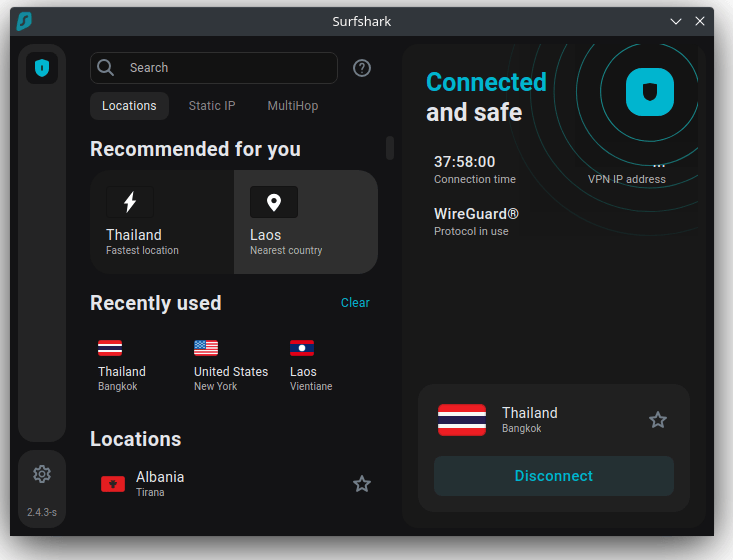
- Banking from Thailand: I couldn’t download my bank’s mobile app from Thailand when I got a new phone. I needed to be in the United States, or at least make it appear as if I was in the U.S. With Surfshark, I set my location to the U.S. and downloaded the app. I also couldn’t open investment accounts for my kids with another bank in the U.S. unless I was in the country. Once again, Surfshark’s VPN helped me bypass that block.
- Protecting my data over wifi: I sometimes work from coffee shops. Usually, I use my AIS pocket wifi for this. But sometimes I forget it at home and need to hop on the coffee shop’s wifi. Surfshark VPN protects my online activity over these wifi networks.
- Streaming Western movies and shows from Thailand: Some of the best Western movies on Netflix and other streaming services aren’t available in Thailand. So, you need a VPN to be able to stream them. Surfshark lets you set your location, this way you can stream your favorite movies that you otherwise wouldn’t be able to watch.
Surfshark VPN protects you in all these cases and many more.
What I Like About Surfshark
If you ask me, all VPNs do basically the same thing. But Surfshark has one advantage over its competitors: pricing.
- Cost: I’m on the Surfshark Starter plan, which costs THB58 a month on the two-year deal, billed as THB1,566 up front for 27 months (VAT may apply). It’s the cheapest VPN I could find online.
- Features: Surfshark gives you all the features you need from a VPN. You can do your online banking from Thailand and use your favorite streaming services without restrictions. Your Internet activity will also be encrypted.
- Easy to use: Even though I am not an IT guy, I was able to set up Surfshark in just a few minutes. And once set up, connecting and disconnecting from a VPN only takes a tap or a button.
No VPN is without its disadvantages. Let’s look at what I consider one downside to using Surfshark.
What I Don’t Like About Surfshark
I don’t have too many negative things to say about Surfshark. Its VPN works as expected. But I do wish it would change two things.
- Dedicated IP address: Surfshark plans don’t come with a dedicated IP address. The add-on costs from US$3.75 extra per month. A few of my overseas clients have to give me access to their websites’ back ends. But when I’m connected to Surfshark, it hides my real IP address (like it’s supposed to), and the website blocks me from logging in. Because I don’t want to pay the additional US$3.75 each month, I use a workaround for this. I briefly turn off Surfshark, log into the website, then turn Surfshark back on.
- No “pause” function on the computer app: On Surfshark’s mobile app, you can pause your VPN connection and then reconnect it with the tap of a button. On the computer app, if you want to pause your VPN connection, you have to disconnect entirely and then reconnect. This takes a bit more time. I’m talking seconds, not minutes, but still.
Aside from these two minor things, Surfshark works just as intended.
Speed and Performance
Some people might be dissuaded from using a VPN because they think it might slow down their Internet connection or cause their streaming experience to lag. With Surfshark, this isn’t the case.
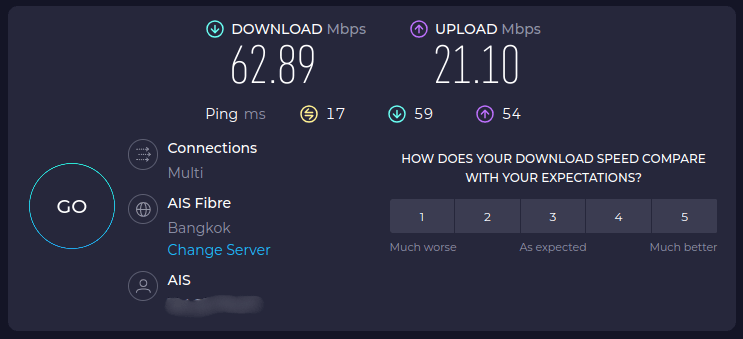
Yes, speeds do decrease. But not significantly. Take a look at this screenshot of my Internet speed while disconnected from Surfshark. Keep in mind our building doesn’t have the fastest Internet service in Bangkok to begin with.
Now compare those speeds to the speeds I get while connected to Surfshark.
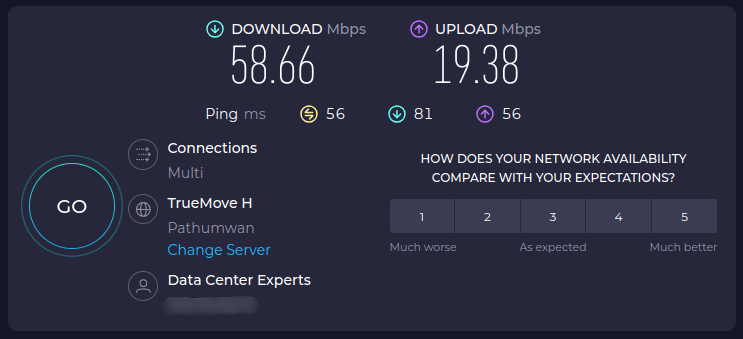
Notice that the Internet download and upload speeds in this screenshot aren’t much different from the first screenshot. In fact, I’ve never had issues streaming Netflix or watching YouTube videos in 4K.

Pricing
Surfshark VPN offers three pricing tiers. The least expensive tier comes with fewer options, while the most expensive tier comes with the most options.
Keep in mind that you should buy a 24-month package from Surfshark to get the best deal. If you pay month-to-month, the Starter plan costs THB518 a month, which adds up to more than THB12,000 over two years.
- Surfshark Starter: On the lower end, Surfshark Starter costs THB58 a month (THB1,566 for the first 27 months). This is what I use and it works great. You get the full VPN, including the ad blocker and Bypasser split tunneling, plus Alternative ID for masked emails and throwaway sign-up details.
- Surfshark One: Surfshark One costs THB68 a month (THB1,836 for the first 27 months). It adds Surfshark Antivirus, Alert data-leak notifications, scam protection, and a web content blocker.
- Surfshark One+: Surfshark One+ costs THB128 a month (THB3,456 for the first 27 months). It adds Incogni data removal, which only works for residents of the US, UK, EU, Switzerland, and Canada, so check that before paying for it.
The two-year plans include three extra months, so you pay for 27 months up front. Every plan comes with a 30-day money-back guarantee, and Surfshark shows visitors in Thailand its prices in baht. (Verified October 2026.)
Privacy and Security
Surfshark values your privacy and offers many tools to protect your online identity.
- No-logs policy: Surfshark doesn’t log what you do online, and its no-logs policy has been independently audited.
- Kill switch: If your VPN connection is interrupted, your online connection drops to protect you.
- DNS and leak protection: Surfshark offers private DNS and leak protection when using the IPv4 stack.
- Secure protocols: Surfshark’s entire server network supports WireGuard, IKEv2, and OpenVPN.
- Encryption: Surfshark uses industry-leading AES-256-GCM encryption to secure your VPN connections.
These are just a handful of the security measures that Surfshark takes to protect your online activity and identity.
Netflix and Other Streaming Services
Many people get a VPN not because they’re trying to cover up what they’re doing online, but because they want to be able to stream their favorite shows and movies while traveling or living in Thailand.
Surfshark lets you do just that. Connect to a server in your home country and you can watch your usual catalog on platforms like these:
- Netflix
- Disney+
- Amazon Prime Video
- Hulu
- HBO Max
- Apple TV
How to Set up Your Surfshark App
Although VPNs seem like “techy” stuff not meant for the layperson, you can set up your Surfshark VPN with the tap of a button.
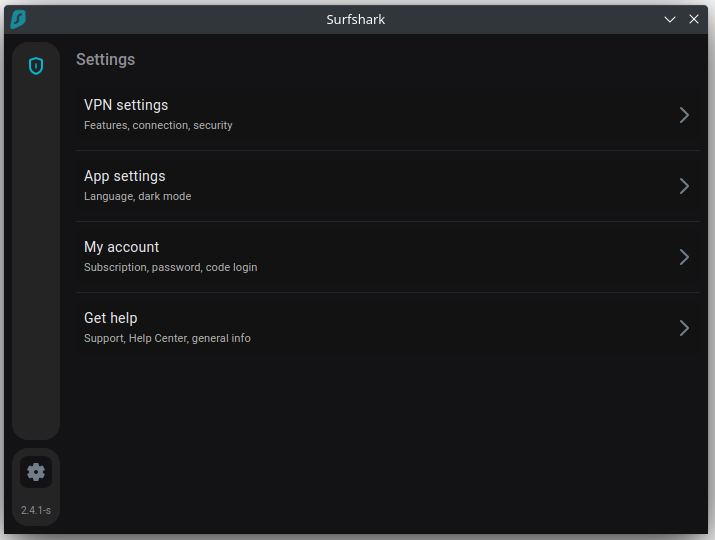
I cover the setup process for Surfshark’s computer app below, but you can follow these exact steps to set up your Surfshark mobile app as well.
Pick Your Surfshark Plan
Visit Surfshark.com and decide which plan you need.
Download and Launch the Surfshark App
Once you pay for the plan, go to the download page and download the correct version of the Surfshark app. The version you download depends on whether you’re using Windows, macOS, or Linux. After downloading the app, open it up.
Enter Your Username and Password
Before you can connect to a VPN, you have to enter the account details you used and created when paying for your plan. Usually, this is the email address you used to create your Surfshark account and the password you set.
Connect to the VPN of Your Choice
Once logged in, you can connect to a VPN in a location of your choosing, or you can connect to the fastest or nearest country.
Connect to a preferred location when you want to stream Netflix, do some online banking, or bypass any other blockers in Thailand. If you just want to protect your identity and online activity, you can connect to the fastest or nearest country.
At this point, you can use the Internet as you like and have peace of mind knowing that your online activity is now protected. But I recommend looking at two more important settings.
Advanced Surfshark Settings
While setting up your Surfshark VPN, you may want to turn on CleanWeb and Kill Switch. CleanWeb blocks various elements that slow down or ruin your online experience. Kill Switch disables your Internet connection.
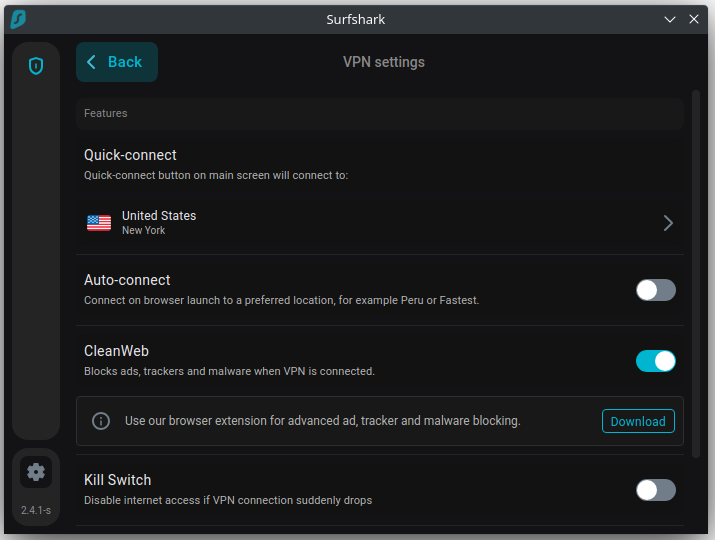
- CleanWeb: Go to Settings > VPN Settings > CleanWeb to block ads, trackers, and malware when connected to a Surfshark VPN.
- Kill switch: Go to Settings > VPN Settings > Kill Switch to disable your Internet connection if your VPN connection drops out.
Surfshark Versus Other Providers
You might be wondering how Surfshark stacks up against other popular VPN providers like ExpressVPN. Despite its low monthly cost, Surfshark doesn’t lag in features and service.
Surfshark uses industry-standard AES-256 encryption, has some of the fastest connection speeds, and has over 4,500 servers in 100 countries, including 20 in Bangkok. (Verified October 2026.)
The costs in the table below are the cheapest monthly rates on each provider’s two-year plan. Surfshark shows Thailand visitors its prices in baht, while ExpressVPN lists US dollars.
| VPN Provider | Price Per Month | Server Locations | Encryption | Speed |
|---|---|---|---|---|
| Surfshark | THB58 | 100 Countries | AES-256 | Good |
| ExpressVPN | US$2.99 | 113 Countries | AES-256 | Fair |
Should You Use a Free VPN?
Although you might be tempted to use a free VPN, you should reconsider. And here’s why:
- Free VPNs are slow: Free VPNs almost always come with data caps and speed restrictions. This means you won’t be able to stream HD movies without experiencing lag.
- Free VPNs have limited options: With a free VPN, you can never pick your location. This means you won’t be able to bypass website blockers when using streaming services or doing your online banking. Surfshark, though, lets you pick your location, so you can make it appear as if you are anywhere in the world that you like.
- Free VPNs aren’t as secure as you think: Most free VPNs make money through collecting and selling data and adding advertisements to your browsing experience. They also don’t encrypt your connection like Surfshark does.
- Free VPNs put you at risk for computer viruses: Because free VPNs aren’t secure, it’s easy for hackers to add viruses and malware to them. This compromises your personal identification instead of protecting it.
Should You Use Surfshark in Thailand?
If you want an affordable VPN that only costs THB58 a month on the two-year plan but comes with all the features you’d expect from a premium VPN provider, I recommend Surfshark.
It’s the perfect choice to use your favorite streaming services, bypass web location blockers back home, use public wifi safely, and protect your online identity while using the Internet in Thailand.
Sources Cited
- Surfshark pricing: plan prices in baht, plan contents, unlimited devices, and the 30-day money-back guarantee.
- Surfshark server locations: 4,500+ servers in 100 countries.
- Surfshark VPN for Thailand: 20 servers in Bangkok.
- Surfshark Dedicated IP: add-on price from US$3.75 a month.
- Surfshark VPN features: kill switch, Bypasser split tunneling, and supported protocols.
- ExpressVPN pricing and server locations: two-year Basic plan price and 113 countries.
- Computer-Related Crime Act B.E. 2550 (Ministry of Digital Economy and Society): Thailand’s cybercrime law.



 Deutsch:
 Français:
'/%3E%3Cpath%20fill='%23b2b2b2'%20d='M241%20382q0%2016%2017%2026%2017%2011%2042%2011t42-11q16-11%2017-26V269H241'/%3E%3Cpath%20fill='%239f7e00'%20d='M241%20379q0%2014%208%2023%209%209%2021%209%2014%200%2021-9%209-9%209-23V269h-59'/%3E%3Cpath%20d='M241%20339v-70h59v110q0%2014-9%2023l-6%205v-68h-15v72q-8%200-14-4v-68zm59%2040c0%2022%2015%2032%2029%2032%2021%200%2030-18%2030-32v-40h-59'/%3E%3Cpath%20fill='%239f7e00'%20d='M266%20277v5h2v12h-3v-5h2v-5h-9v5h2v5h-4v9h3v18h-5v10h34v-10h-5v-18h3v-9h-4v-5h2v-5h-9v5h2v5h-3v-12h2v-5zm42%20101q0%2010%206%2017%206%206%2015%207%2010-1%2016-7%206-7%206-17v-29h-43'/%3E%3Ccircle%20fill='%230044ad'%20cx='329.5'%20cy='372'%20r='6'/%3E%3Cellipse%20fill='%230044ad'%20cx='300'%20cy='340'%20rx='16'%20ry='21'/%3E%3C/svg%3E) Español:
Español: